Every document accounted for. Every number checked twice.

Case Manager organizes each case's documents, pulls the numbers out of every statement, double‑checks them, and shows your whole caseload on one page. Your team spends its time on analysis, not paperwork.

Runs in your firm's own Microsoft Azure environment. Nothing is uploaded to us. Your case data is yours, and it stays yours.

Your caseload, this morningUp to date
MatterStageNeeds youStatement monthsOwner
Alder v. AlderReading statementsNothingM. Ortiz
Estate of PellOrganizing4 questionsR. Chen
Whitcombe HoldingsFindings readyNothingA. Brooks
Navarre v. NavarreOrganizingStalled 6 daysM. Ortiz
Kessler TrustReading statements2 to confirmR. Chen
Sample cases with made‑up data. Each bar is one month of statements: green means it's been received, red means it's missing and needs to be requested.

Your best people are sorting paper.

Each new matter arrives as thousands of statements, records, contracts and emails. Skilled staff spend days organizing them and typing numbers into spreadsheets before the real work starts. Then, months later, someone asks the question every litigator dreads:

"How do you know nothing was missed or misread?"Opposing counsel, every time

Sorting and naming

TodayDays of staff time on every matter.

With Case ManagerDone as each delivery lands, using your firm's own naming and folders.

Statement entry

TodayKeyed line by line and checked by eye.

With Case ManagerRead twice by independent AI systems and proved against the bank's printed balance.

Missing statements

TodayFound late, sometimes by the other side.

With Case ManagerFlagged as soon as a month is missing, with a request ready to send.

The record

TodayWhatever someone remembered to write down.

With Case ManagerEvery step and every decision recorded permanently, with who made it.

Your team keeps working the way it does today.

  1. 1

    Drop in the documents

    Staff save each new delivery to the case folder, just as they do now.

  2. 2

    They're organized your way

    Every document is named, filed and listed using your firm's own rules.

  3. 3

    The numbers are pulled and checked

    Every statement is read, entered and double‑checked before anyone relies on it.

  4. 4

    Your team reviews and reports

    People answer the few open questions. Findings come back with a source for every item.

From the moment a statement lands to the moment it's filed, checked and on the record. Sample case, made‑up data.
What this video shows

The video has music and no narration. It follows one sample statement, with made-up data, from the moment it lands to the moment it's filed, checked and on the record. The page describes the same path in four steps:

  1. Drop in the documents. Staff save each new delivery to the case folder, just as they do now.
  2. They're organized your way. Every document is named, filed and listed using your firm's own rules.
  3. The numbers are pulled and checked. Every statement is read, entered and double-checked before anyone relies on it.
  4. Your team reviews and reports. People answer the few open questions. Findings come back with a source for every item.

The screens your team works in every day.

Shown across four practice areas with a sample firm and made‑up cases. The categories and parties change with the practice; the engine doesn't.
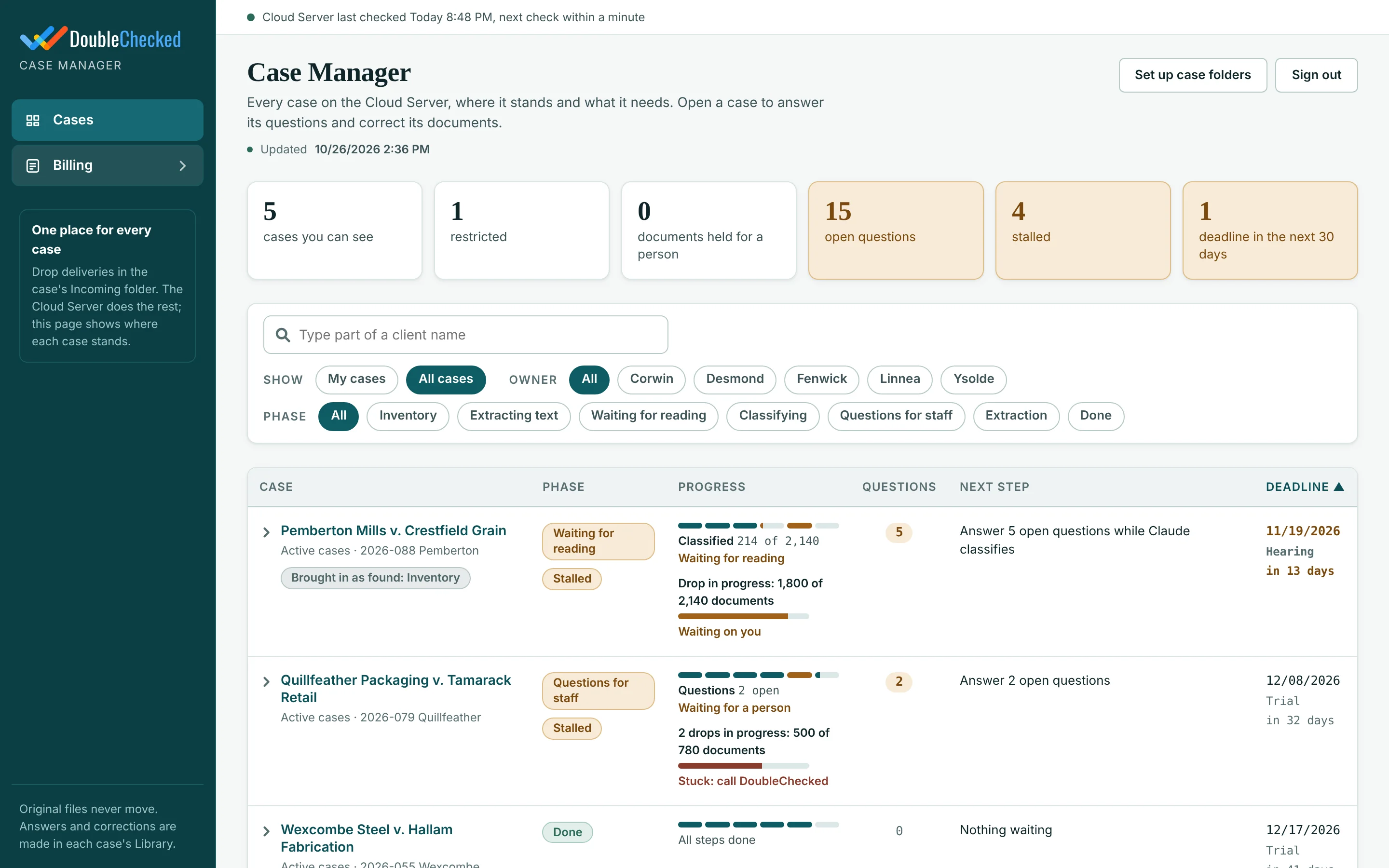
Every case on one page

Curious what happens behind the scenes? Watch the data move

What isn't there matters as much as what is.

Case Manager connects what the documents say to what you actually have. When a document points to something nobody has produced, it becomes a lead.

Money with nowhere to go

A $150,000 wire on a statement goes to an account ending 6612. No statements for that account were produced, so it's flagged as a lead, with the line it came from.

Months that are missing

Every account is laid out month by month. A missing statement between two that exist is a request to make or a gap to explain.

Things documents mention

A safe deposit box in a codicil, a policy in a trust agreement, a provider in a doctor's note. If nothing was produced for it, you'll know.

Flags, not conclusions

Every item cites its document and page. Your professionals decide what it means.
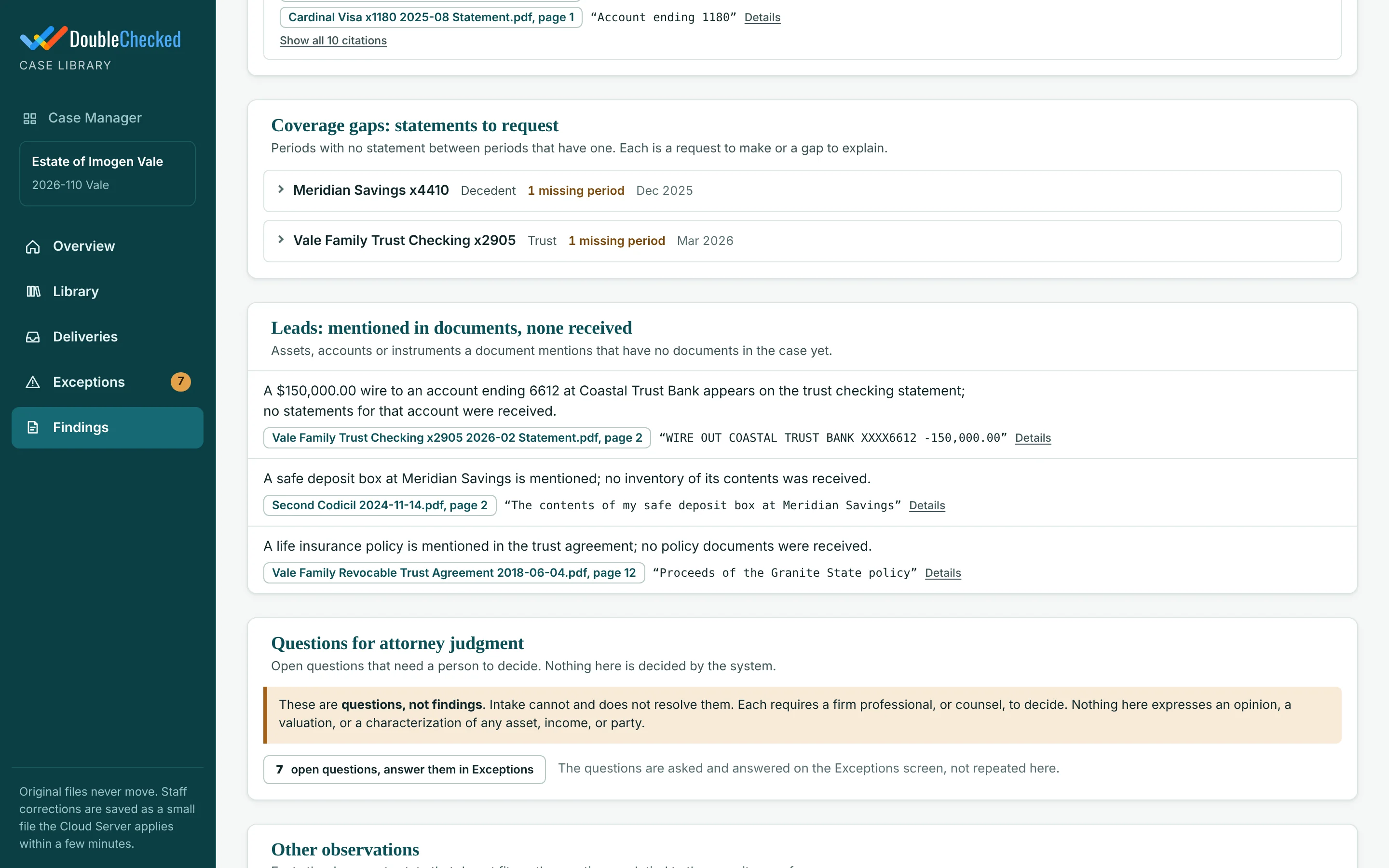
Findings showing coverage gaps and leads, including a $150,000 wire to an account with no statements

We assume a computer can be wrong, so we built in ways to catch it.

Read twice

Two different AI systems read every statement separately. If they don't agree, it doesn't go through.

The math has to add up

Every line is checked against the balance the bank printed. If the totals don't tie out, the numbers aren't accepted.

A person decides the rest

Anything uncertain is set aside for your team with the reason shown. The system never guesses.

Your team checks what needs a person, not everything. Case Manager shows which lines are already proved, and why, so review time goes where judgment is actually needed.

See all 14 checks, step by step

Case Manager by the numbers.

18,748 documents in 30 days

Read, named and filed for one CPA firm in a single month: about 160,900 pages across 50 active cases.

85% with no question to staff

85% of documents were filed with no question to staff.

About an hour per delivery

A typical delivery is fully classified within about an hour of arrival.

6,570 documents in 3.8 hours

Its largest single delivery, 6,570 documents, was processed in 3.8 hours. The manual sort it replaced took five or more days per case.

More matters, less risk, the same team.

Take on more work without hiring

The days each matter used to spend on sorting and data entry go back to billable analysis.

See every case at a glance

One page shows each matter's stage, owner, open questions, missing statements and upcoming deadlines.

Stand behind every number

Every figure traces back to the exact document and page it came from, and every decision shows who made it.

Keep your way of working

Your file names, your folders, your inventory format. We set it up around you, not the other way around.

For your attorneys

Complete, organized document sets for every matter: gaps found, every fact tied to its page, ready for discovery, mediation or trial without waiting weeks for a manual workup.

For the experts you retain

Hand them an organized, verified record instead of a box of PDFs, with every number traceable to its page and every decision on the record.

For your case team

A short to‑do list in deadline order, instead of a pile. Stalled cases and missing statements are flagged automatically.

For billing

Charges for each delivery are calculated at your rates and rolled into one firm‑wide workbook.

Your case data never leaves your firm's systems.

Case Manager is installed inside your firm, not hosted by us. Your documents, your extracted numbers, your findings and your records all live in your firm's own Microsoft Azure environment, under your control.

Your firm

  • Client documents
  • Extracted statements and numbers
  • Findings, inventories and billing
  • The full record of every step
  • The system itself, running on your computer

All stored in your firm's own Microsoft Azure environment

DoubleChecked

  • No copy of your documents
  • No database of your cases
  • No access unless you grant it

We set it up and support it. We don't hold your data.

Confidential by design

There's no DoubleChecked server for your files to sit on, so there's nothing of yours on our side to leak, subpoena or lose.

Cases never mix

Each case keeps its own documents and its own record in its own folder. Nothing is pooled with other cases, and never with other firms.

Originals never touched

The system works on copies. What your client sent is never changed, moved or deleted, and every step is logged permanently.

To read documents, the system uses Claude, an AI service your firm subscribes to directly, under your firm's own business agreement. If a client hasn't agreed to AI review, their documents go in a protected folder the system never opens. Details for IT

A fixed price before anything is built.

No per‑seat surprises and no commissions. The assessment ends with a written plan, a timeline and a fixed quote, so you know the full cost before you commit to anything else.

Step 1: Assessment

Scope it properly

Fixed fee, agreed before we start

  • Map your naming, filing and inventory rules
  • Review your Azure and Microsoft 365 setup with your IT team
  • Walk through the platform on our demonstration case
  • A written plan with a fixed quote and timeline
Step 2: Deployment

Built in your Azure

Fixed fee, set in the assessment plan

  • A dedicated environment built in your Azure subscription
  • Configured to your conventions and practice areas
  • Existing cases brought in as they are
  • Staff training and go‑live support
Step 3: Platform

Running every case

Annual fee, set in the assessment plan

  • Organizing, statement reading and findings
  • The firm‑wide caseload view and billing rollup
  • Monitoring, updates and support
  • Multi‑office and restricted‑case access available

AI usage is billed to your firm directly by your AI provider. DoubleChecked does not resell it or mark it up.

Straight answers.

What happens when the AI gets something wrong?

We expect it to happen sometimes, and the system is built to catch it. Everything is read twice and checked against the math. Anything that doesn't pass goes to a person to decide.

Where is our data stored? Do you keep a copy?

Everything is stored in your firm's own Microsoft Azure environment: documents, numbers, findings and the full record. Nothing is uploaded to DoubleChecked, and we don't keep a copy. Each case's data stays in that case's own folder, so cases never mix. If you stop using the system, all of it is still yours, exactly where it is.

Do we have to change how we work?

No. We set the system up to follow your naming, filing and inventory format. Staff keep saving documents where they do today.

What about cases we're already working on?

We bring them in as they are, without moving anything, and that setup work is never billed to a client.

Can the system testify?

No. Your expert testifies. The system gives them a complete record of what was received, what was done, who decided what, and where every number came from.

How long until we're up and running?

It depends on your Azure environment and how many practice areas we configure. The assessment produces a written plan with a timeline and a fixed price before anything is built.

Who is DoubleChecked?

A custom AI software and AI enablement firm for regulated financial and professional firms, working since 2019 from Jacksonville and Atlanta. We don't resell software or take commissions. Case Manager runs every day on active matters at a CPA firm's forensic practice. More about DoubleChecked

Overview/How we get it right

How we get the numbers right.

No single reader is trusted, human or AI. Each stage has its own check, run separately from the one before it. A document only moves forward when its checks pass, and when one fails, a person sees why.

For partners, attorneys, the experts you retain, and anyone who will rely on the numbers.

Every document passes these before it reaches your report.

Stage 1Receiving

Every file counted

Every file in a delivery is counted and matched to the record. A missing file is flagged, never ignored.

Fingerprinted on arrival

Each file gets a unique digital fingerprint, re‑checked on every run. If an original changes, work on that case stops.

Unreadable files flagged

Password‑protected, damaged or incomplete files are recorded with the reason, never skipped.

Duplicates caught

Exact copies are recognized, so the same statement is never counted twice.

Stage 2Reading

Hidden text scan

Documents are checked for hidden or invisible text, including instructions planted to mislead AI. Suspect files are held.

Filing checked by a second AI

One AI proposes how a document is named and filed. A separate, stronger AI checks it before anything is filed.

Two independent reads

Two different AI systems read each statement separately, without seeing each other's answers. Every line is compared.

Tie‑breaker read

Where the two reads disagree, a third read runs. If it's still unsettled, a person decides, with every reading shown side by side.

Stage 3Proving

Running balance must tie

The opening balance plus every line must equal the balance the bank printed, all the way to the closing balance.

Checks and deposits matched

Each check image, including the bank routing line printed on it, is matched to the statement line where it cleared. Deposit slips are matched the same way.

Investment math verified

Starting value, activity and ending value must reconcile before an investment or retirement statement is accepted.

Documents tied together

Pay stubs are tied to W‑2s, and W‑2s and K‑1s to the tax return. A mismatch becomes a question for your team.

Stage 4Reporting

Missing months shown

A calendar lays out every account's statements, so a gap is visible before anyone relies on the set.

Every finding cited

Each finding is checked against the document and page it cites. Anything without a source is clearly marked UNCITED.

The rule under all of it: no AI grades its own work. A number is accepted only when independent reads agree and the arithmetic proves it. Every line ends up either certified or set aside for a person. There is no "probably right."

Behind the scenes

Watch the checks happen.

These animations are not screens your staff use. They show what the system is doing with your data behind the scenes, step by step, on a sample case.

Left: the page as received. Middle: the two reads side by side, with the one disagreement sent to a tie‑breaker. Right: the balance walk that has to reconcile before any line is certified.
Six controls run on every document, with the live record beside them.
The reader learns each bank's layout once, so every later statement from that bank is read and checked the same way.

What "certified or set aside" looks like.

Most AI tools ask the AI how confident it is. We never do. A line is certified only when the evidence closes.

Two separate reads

Different AI systems read the same statement. Neither sees the other's answer.

The statement checks itself

If the lines don't add up to the bank's own balance, nothing in that stretch is certified.

Disagreement goes to a person

Your staff see both readings and the page image, and confirm the right one with a reason recorded.

DateDescriptionAmountBalanceStatus
03/01Opening balance18,402.17ties
03/04Payroll deposit6,215.4024,617.57certified
03/07Check 1184−2,400.0022,217.57certified
03/11Wire out, ref illegible−9,800.00 / −9,300.0012,417.57set aside
03/15Transfer to savings−1,000.0011,417.57certified
03/31Closing balance11,417.57ties

Sample data. The two reads disagreed on the 03/11 wire, so it waits for a person. The bank's printed balance shows −9,800.00 is right, and staff confirm it in one click.

Overview/For IT & Security

What your IT and security team is approving.

A short, specific list. Case Manager is deployed inside your firm's own Microsoft Azure environment, under your own AI agreement. There is no DoubleChecked server, database or cloud storage in the data path, and we never hold your client documents.

For CTOs, IT directors, managed IT partners and security reviewers.

Architecture and requirements.

Deployment means building a dedicated environment in your Azure subscription. We scope it with your IT team first, then build, test and hand it over.

Data residency and isolation

Storage
All documents, working copies, extracted data, findings, logs and the case database live in your own Microsoft cloud: the Azure virtual machine that runs the platform and your existing SharePoint case folders. Nothing is stored by DoubleChecked.
Uploads
None to DoubleChecked. The only external processor is Claude, which reads document content under your firm's own Anthropic business agreement and Team seats.
Isolation
One deployment per firm, never multi‑tenant. Each case keeps its own record and library in its own case folder; there is no cross‑case or cross‑firm data store.
Ownership
Everything the system produces is a file in your environment. If you stop using the platform, the data stays where it is, in readable formats (Excel, PDF, CSV, HTML).
Vendor access
None by default. Support access only if and when you grant it, through your own controls.

Where it runs

Compute
A dedicated Windows virtual machine in your Azure subscription, reached over your VPN
Files
Your existing SharePoint and OneDrive case folders
AI
Claude, under your firm's own Anthropic business agreement (Team seats)
Screens
Self‑contained pages opened in Edge. No vendor server and no outbound calls from the review pages
Vendor
DoubleChecked receives nothing automatically

What you provide

  • An Azure subscription to host the platform's virtual machine, with a signed‑in service account
  • Claude Team seats for staff who use it
  • Microsoft 365 E3, E5 or Business Premium for the optional retention policy layer
  • Recommended: read‑only SharePoint permission for the service account
  • A small desktop helper on staff laptops that opens documents in their native programs

How it's built

  • Plain Node.js with no third‑party packages, so there's no dependency supply chain to audit
  • Deterministic: the same record always rebuilds the same screens, byte for byte
  • Opens a 10,000‑document case in 0.2 seconds; an idle check cycle takes about one second
  • Record kept in two places; restore only adds what's missing

How it's tested

  • 13,600+ automated tests per full release run, zero failures at last release
  • Each write guard deliberately broken to prove a test catches it
  • Browser checks of every screen and runs against read‑only case folders
  • Security questionnaire and architecture review available on request
Behind the scenes

The pipeline, step by step.

These animations visualize what happens to your data on each pass: what was fingerprinted, what was read, what the AI was sent, and what was written to the record. They illustrate the engine; they are not the staff interface.

Each pass of the pipeline. Note the data boundary panel: files stay on your server, and the AI is sent page text only, with no tools.
Case progress, statement months, certified lines and machine status in one view.
The six steps every document moves through.

Enforced in code, proved by tests.

Each safeguard is tested by breaking it on purpose and confirming the test fails.

Write‑once record

Every action lands in write‑once commit files. Every screen, workbook and report is rebuilt from that record. If a screen and the record disagree, the record wins.

Preservation snapshot first

Path, size, timestamp and SHA‑256 of every file, taken before any other step and itself hashed. Re‑verified on each run; a mismatch halts.

One write gate

Writes are allowed only to the platform's library, working‑copy and status folders. A source scanner fails the build if any other write path appears.

AI can't write case files

The AI may write only to its own results folder. Shell access is denied, and a hook re‑checks every write.

Circuit breaker

If files go missing or change unexpectedly beyond a small threshold, that case stops until a person resumes it.

Attributed decisions

Each human correction is a write‑once decision recording the signed‑in user, the old value and the new one. Conflicts become questions, never overwrites.

Prompt‑injection detection

Hidden text and instructions aimed at AI are detected, flagged red, and the document is held.

Least privilege on your side

Scripts supplied for a read‑only SharePoint permission and a Purview retention policy.

Good questions to ask any vendor.

Whichever platform you evaluate, these are the answers that matter to a firm whose work may end up in court. Here are ours.

QuestionHow Case Manager answers it
How is each extracted number proved?Two independent reads must agree, and every line must tie to the statement's own running balance.
How many checks run before a number reaches a report?Fourteen, across receiving, reading, proving and reporting.
Can we show exactly what was received, unaltered?Yes. A fingerprinted preservation snapshot is taken first, and the record is write‑once.
Where do client documents live?In your firm's own Microsoft Azure environment. Nothing is uploaded to DoubleChecked.
Which outside services see document content?One: the AI service, under your firm's own agreement.
Is our data used to improve the software?No. We never receive it.
Is the client‑consent boundary enforced in code?Yes, at the single point where files are read, and proved by test.
Does it follow our conventions?Yes. It's configured to your naming, filing and inventory rules.
Who is the vendor accountable to?You. DoubleChecked is independent, works on fixed fees and takes no commissions.

For your security review.

Will client documents be used to train AI models?

Documents are processed by Claude under your firm's own Anthropic business agreement, and those terms govern how your data is used. DoubleChecked never receives your documents automatically.

Is there a hosted application or vendor server?

No. The platform runs on a virtual machine in your Azure subscription, and the review screens are self‑contained pages that make no network calls.

What does DoubleChecked have access to?

Only what you grant for support and monitoring. Nothing is sent to us automatically.

What happens if the virtual machine goes down?

Screens show a red status banner within ten minutes. The record is kept in two places and rebuilds every screen exactly, and restore only adds what is missing.

Which file types are supported?

PDFs, Office documents, Outlook emails with attachments, and zip files, from SharePoint, OneDrive, secure file shares or email.

See it in action in 30 minutes.

We'll walk through our demonstration case with you, from a delivery landing to cited findings. If you'd like, bring your IT lead and we'll cover their questions too.

Prefer to reach us directly?info@doublechecked.com(904) 701‑0153
  • Pick a time that suits you and your IT lead.
  • Tell us about your caseload in the booking note. A few sentences is enough.
  • A 30‑minute walkthrough of our demonstration case, with your IT lead if you like.
Book a 30‑minute walkthrough Or send us a note first
  • A fixed price before we build
  • Your data stays in your environment
  • NDA before the first session
  • Reference calls under NDA
  • Cyber and errors and omissions insurance
  • Since 2019